Showing posts with label CalvinMai. Show all posts

Monday, May 19, 2014

Calvin Mai: Week 7 Nautilus


For my lamp, I was inspired by the nautilus, and a seashell, and tried to combine aspects from both to create my final lamp design. I also wanted to create a economical and small lamp, so this lamp can be cut 4 times from a sheet of 24"x48" material

For my model, I created a base form with curves and then lofted it. After I created my base form, I sectioned it and used the pipe method to create the notches in the sections. After that I used massive unroll script to unroll it out. After I unrolled it, I extruded each of the surfaces to my material thickness.

For my lamp, I chose Red oak, as that would be my ideal material of choice for my lamps, but I used a default lighting environment that I played with the contrast and brightness. For my actual lamp, I used a corrugated cardboard, with the westinghouse light.

Wednesday, May 7, 2014

Calvin Mai: Week 6 The King


For my ring, really wanted to create something sexy and intricate, but nothing common, like some of the rings based off of the One Ring. So I based most of my inspiration from the crown that is given to Aragorn at the Crowning of King Elessar at the end of The Return of the King.

For my ring, I first created each of the elements, using curves to draw out the shape, create the surface with PlanarSrf, then extrude that surface at varying levels. I also used Boolean Difference, Union, and 2 objects, pipe and a lot of Fillet and FilletEdges to complete it. Finally, I extracted the surface of my ring, unrolled it, oriented my objects on the surface, then used FlowAlongSrf to orient everything on there.

For my materials, I just stuck with creating the same look as the crown, so I used a Cast Iron with Paint and changed it to metallic paint, to give the ring a dull metal look. I played around with the colors to change the accents and to give it a authentic look of metal.

Thursday, May 1, 2014

Calvin Mai: Week 5 Sunglasses (Slims)


For my inspiration, I based much of my design from the classic Ray Bans, but I gave it a nice modern twist.The hinges are magnetic, allowing for the sides to easily snap on or off, allowing customers to change and personalize their earpieces, with custom designs and colors. 

For the techniques I used, I used a combination of Curves and Crv2Views to model the sunglasses more accurately. That, combined with Bend for the Earpieces, FilletEdges, Split, Trim, Patch, ExtrudeSrf, and rotate, I managed to achieve the overall effect.

For my material choices, I used hard shiny plastics of varying color for the sides, and a black shiny plasti for the frame. I then used Aluminum for the accents and the hinges, and a glass for the lenses

Monday, April 21, 2014

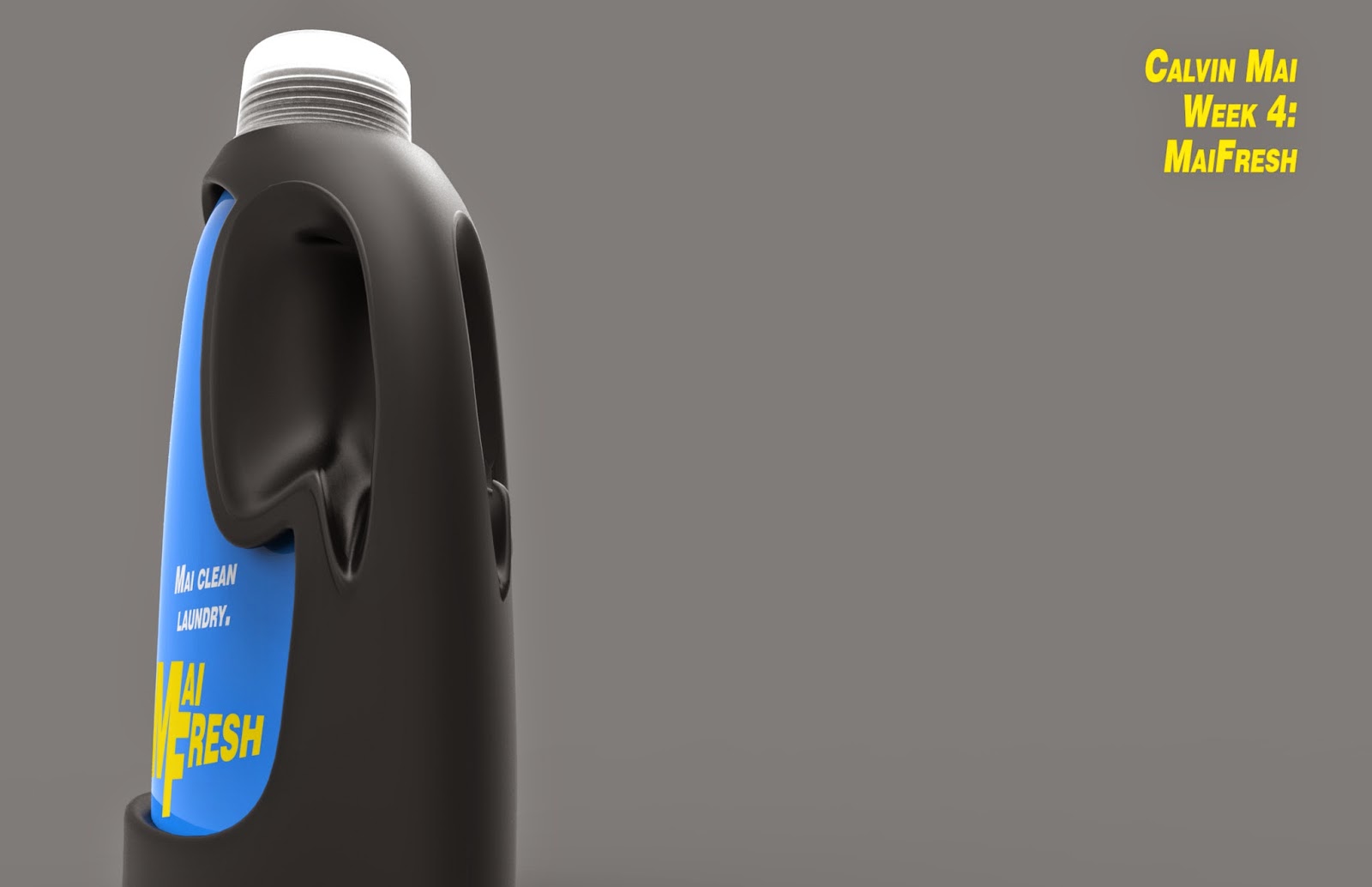
Calvin Mai: Week 4 Detergent Bottle


I looked at the reference images, and noticed that none of the detergent bottles looked very sleek or windswept. So I took reference mostly my imagination, making the curves to make the detergent bottle sleek and sexy smooth. Now that I look back, I can see some car, specifically a Jaguar that I associate with this car that I could have used as a reference. For the name, I derived it from my last name, and added a clever pun to increase marketability.

For my model, I started out with a loft and sweep 2 between curves, that I drew, then I split each part into sections that I could delete away, for example, the handle. Then after that I would blend the surface to get it blended, filleted some edges, Split, trim, Helix, Orient perpendicular to curve, among lots of blend surface and join to join it all together.

For my materials, I chose a hard rough black plastic for the main body to increase grip, and a shiny blue plastic to give it it's sleek quality. For the cap I used a cloudy plastic, much like the caps seen in detergent bottles today.

Monday, April 14, 2014

Calvin Mai: Week 3 Mouse


     For my mouse design, I really took inspiration from an Orca (Killer Whale). I really wanted to create an ergonomic mouse that flowed and emulated the shape of the whale; the curve creating the image of a tail at the end while the head of the whale is emulated in the front. The whole design is based on an ergonomic mouse, so that the curve of the hands would sit nicely on the mouse.
     For my mouse, I used Loft and Sweep2 to create the initial shape, then used the CreateSolid command to make it solid. After that, I used a combination of Split, Cage Edit, PlanarSrf, ExtrudeSrf, Array Polar in the scroll wheel; lots of Pipe and Diff, and a lot of Fillet and Fillet Edges to get all the curves.
     For the materials, I wanted to create a smooth, easy to grip, soft yet sexy ergonomic mouse, so I used SnowStorm axalta Paint changed to plastic, a Soft Rough plastic for the scroll wheel for grip and comfort ability in scrolling, and a hard rough plastic for the outside to provide grip, and to provide a nice texture to put your hand on. For the final stripe accent along the back, I used a simple hard shiny plastic that I customized the color to the user's preference

Monday, April 7, 2014

Calvin Mai: Week 2 Flashlight


For my design influence, I drew a lot of my inspiration from different light-sabers, as I really wanted to create a light-saber sleeve for my print. My inspiration mostly emulates Mace Windu's light-saber, even using the same material, while still putting my own design into the piece. The grip is designed after Mace Windu's, while the main body comes more from Luke Skywalker's light-saber.

In my design, I used array polar on pipes to achieve the grip and the grooves, while using Boolean Difference to create the grooves that recede. Initially, I used Record History along with revolve to create the starting sleeve, which allowed me to play around with the control points to achieve the look I wanted. From there, I filleted most of the corners, and chamfered a few corners. I also used truncated pyramids for the detail.

This was modeled to look similar to Mace Windu's light-saber, using 24k Gold as the accents, Aluminum polished as the main body and the inside light disc, Chrome Black for the bottom handle in the grip, while the grip itself was Shiny Black Leather. I used Hard rough plastic - Black for the toggle, and Gold for the other button. I used Night Tides Axalta for the truncated pyramids, and Snow Storm for LED's.

Monday, March 31, 2014

Calvin Mai: Week 1 Castle

 Bird's Eye View
 Pedestrian View
Ghosted View

My castle came with an Asian influence, thinking more towards the lines of pagodas and also thinking about churches that I've studied in Art History that incorporate a circular theme. I used a lot of ArrayPolar to create the repeating shapes, using the command Twist as an integral part of the design to create the twisted pillar, and Boolean Difference to create grooves in the roof. I also combined shapes together to form units that I could then scale down to incorporate in a bigger design. For my material choices, I used a light Granite as the floor, and a darker granite as the pillars to contrast the different units while still creating unity. I used aluminum as the center column to provide support, and axalta on the walls to give it a gloss.