Showing posts with label Jamie. Show all posts

Thursday, November 21, 2013

Kirsten Warkow: Week 10 Scanned Object


Spoka the Panda (object that was scanned)
Close Up of Mesh

Original Mesh of Panda
Ghosted View of Tootie

Keyshot Rendering

Keyshot Rendering

Keyshot Rendering


UPDATE: After a little misunderstanding, I created a separate product apart from the 3D scanned image that Jamie and I uploaded. After working with the mesh, neither of us could figure out how to extract the surface curves from our mesh model, so we created curves based on our right, front, and top views of our mesh and swept the panda.
In my own modeling of the Panda product, I decided to make "Spoka" into "Tootie," the Toot Scoot Panda! Toot Scoot Panda is meant to be a toy car. I used boolean difference and fillet edges to create the wheels and hat.
In Keyshot, I rendered my panda with hard plastic and soft touch material. I gave the Toot Scoot Panda a hat so he could be "off to the races!"


 For the laser scanning project, Jamie Lim and I scanned my squishy panda light named Spoka. I had originally tried to scan a few other objects such as my garmin watch and a foam model of a babushka doll, but neither of those models were fused and cleaned up properly to use as acceptable models. The Panda Light was a large file, but worked and was our best model. Because of his form and size, I thought Spoka would be a perfect object to be scanned. Scanning using the next engine scanner was quite frustrating at first, but we ended up getting a good product after a few tries!
In Scan Studio, 7 pictures were taken of the panda light which I then aligned and fused. Then, when I imported the model into Rapidworks, I "Globally Remeshed" the light to create a smooth, even surface.
I then imported the model into Rhino, which Jamie remodeled the mesh of the panda and rendered the object in Keyshot with soft plastic.

Wednesday, November 20, 2013

Jamie So Whi Lim: Week 10 Laser Scan

For this project, I worked with Kirsten. We tried to scan a few objects like a watch, doll, and a panda light. The most successfully scanned one was the panda, so we decided to work with it. We smoothed out the panda with rapidworks. When we brought it to rhino, there was not much to fix.
Then I remodeled the panda light. I rebuilt a sphere and moved the control points around. When I was rendering in keyshot, I used a blue area light for the inside, and a clear plastic for the outside so that the color of the light would show through the outside part of the panda.
For the rendering of the original rhino with meshes, I used soft rough plastic with red color.


meshes in rhino
close up view (meshes were too close together)
remodeled in rhino
original mesh rendered in keyshot


remodeled rendered in keyshot

original panda light

Monday, November 18, 2013

Jamie So Whi Lim: Week 10 Camera

My camera was inspired by the model Samsung Smart Camera WB250F. Smart Camera is one of my favorite camera because both the functional and aesthetic values of it. Inspired by the Smart Camera, I created a similar design, but I changed the places for some of the buttons, and I changed the color also.
For commands, I first made a curve and extruded it to make the basic body for the camera. Then I made cylinders and booleandifferenced it for the lenses part. I then made a slightly smaller cylinder and placed it in the booleandifferenced space. I projected the screen and spliced it because I didn't want the screen to be cut inward.
For materials, I used hard plastic for the body, projected a photo of a screen from online through keyshot, and metallic paint for the line details on the lenses.


Monday, November 11, 2013

Jamie So Whi Lim: Week 8 Tubular Chair

I wanted to make a chair that has light weight so you could move it around easily and place it anywhere such as, the backyard, in your house, and room. I went for a simple design to show that the chair has light weight. For the commands, I used pipe, split, and blend srf the most. I basically made curves and piped them and arrayed it. 
For the materials, I used aluminum for the body part and plastic for the the part where you sit down. I didn't put in too much colors to focus on the light weight of the chair. 


Monday, November 4, 2013

Jamie So Whi Lim: Week 7 Lamp

I wanted to create a lamp that would be used as a night light. This lamp would be placed close to the bed most likely. So I went for a stable and simple design that would look relaxing. For the commands, I  first made a curve and revolved it in a full circle. I then used contours and section command. I used a lot of pipe, copy, move, and extrudesrf command throughout the project. For the materials, I used dark glossy wood. I didn't want a light and bright color because it's supposed to be placed in the bedroom. I thought that dark brown would look relaxing and comfortable just like the mood of a bedroom.


Monday, October 28, 2013

Jamie So Whi Lim: Week 6 Ring

My ring was inspired by the brand Chrome Hearts. Every time I looked at rings, they were either too fancy to wear everyday. I wanted to design a ring that looks not to fancy, but with style. I didn't want to make it too girly or boyish. 
For my ring, I used a tube for the basic body shape of the ring. I re-scaled it and made it bigger. I rebuilt an ellipse to make those cross looking shapes. The one in the middle is kind of rounded because it is the point of the ring. The rest of the cross shapes are flat. I used curved, mirrored it, and extruded it. For the diamonds in the middle, I made a pentagon and used the extrude to point command. 
For the materials, I used black chrome for the one done in passes. For the one done in keyshot only, I used platinum and grey colored chrome. I used black and silver for most of the ring because those colors go well with any other colors of clothes you wear.


 Keyshot

Passes

Monday, October 21, 2013

Jamie So Whi Lim: Week 5 Sunglasses


I named my sunglasses as SHēk because it is the pronunciation for chic, which means stylishly fashionable. And stylish sunglasses was the concept for my design. I went for a classic but a unique look for my sunglasses. I have a multiple color for my glasses so that the target of my sunglasses could be almost anyone. There is blue, red, and black and gold. I used booleandifference, sweep2, extrudecrv, and the crv2view command. For the materials, I used metallic paint and glossy paint. For the lenses, I used glasses.

Tuesday, October 15, 2013

Jamie So Whi Lim: Week 4 Detergent Bottle

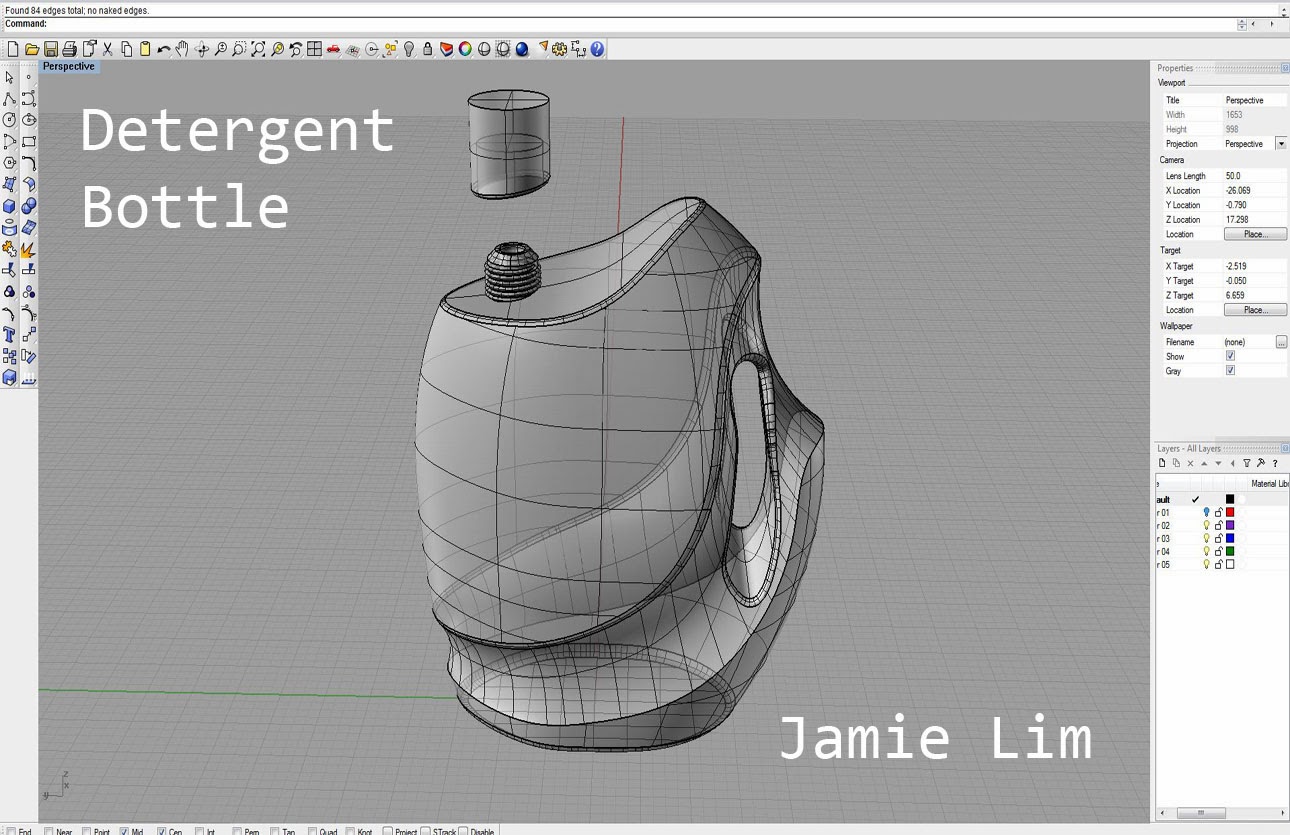
For my detergent bottle, I focused on making it look pretty because most of the customers who buy it are women. I made the bottle pink and added a picture of flowers so it would make it look clean. I used sweep 1 and sweep 2, trim, helix, and scale the most for this bottle. I used shiny plastic and clear plastic for the bottle. And I used the color pink because it matched the color of the flower for the aesthetic values. 


Jamie So Whi Lim: Week 4 USB


I wanted my USB to look transparent so I could make it look light. For my commands I used sweep2, offset, and trim the most. I also used booleandifference for some of the parts. My USB is mostly plastic. I used clear and cloudy plastic for the materials. And I used gold for the USB logo so it would pop out from the rest of the blue colors.